We Analyzed 10,000 CVs: These ATS Errors Are Killing Your Job Search
Every week, millions of qualified candidates apply for jobs and hear nothing back. Not a rejection. Not an interview. Just silence.
Most assume it's about experience, or competition, or luck. Our data suggests something far more actionable: 73% of the resumes we analyzed had at least one critical error that prevents them from being read correctly by Applicant Tracking Systems (ATS).
This isn't a theory. We ran 10,000 resumes submitted through Haired's AI-powered CV Optimizer through a comprehensive ATS simulation engine — the same systems used by Workday, iCIMS, Taleo, and Greenhouse — and documented every parsing failure, keyword gap, and formatting issue we found.
The result is the most granular publicly available dataset on ATS resume performance in 2025.
Is Your CV One of the 73%?
Upload your resume to our free AI analyzer and find out exactly which ATS errors are hurting your job search — in under 60 seconds.
The Scale of the Problem: What Our Data Shows
Before we dive into specific errors, let's set the context with what the 10,000-resume dataset revealed at a high level:
| Metric | Our Finding |
|---|---|
| CVs with at least one critical ATS error | 73% |
| CVs with formatting errors (tables, columns, graphics) | 61% |
| CVs with keyword match below 40% for their target role | 58% |
| CVs where contact info could not be parsed correctly | 31% |
| CVs with non-standard section headings | 44% |
| CVs with embedded images or graphics | 29% |
The data aligns with broader industry research. A Harvard Business School study of 2,250 executives found that 88% of employers believe high-skilled candidates are being incorrectly filtered — not because they're unqualified, but because their resumes fail the technical screening layer.
Error #1: Tables and Multi-Column Layouts (61% of CVs)
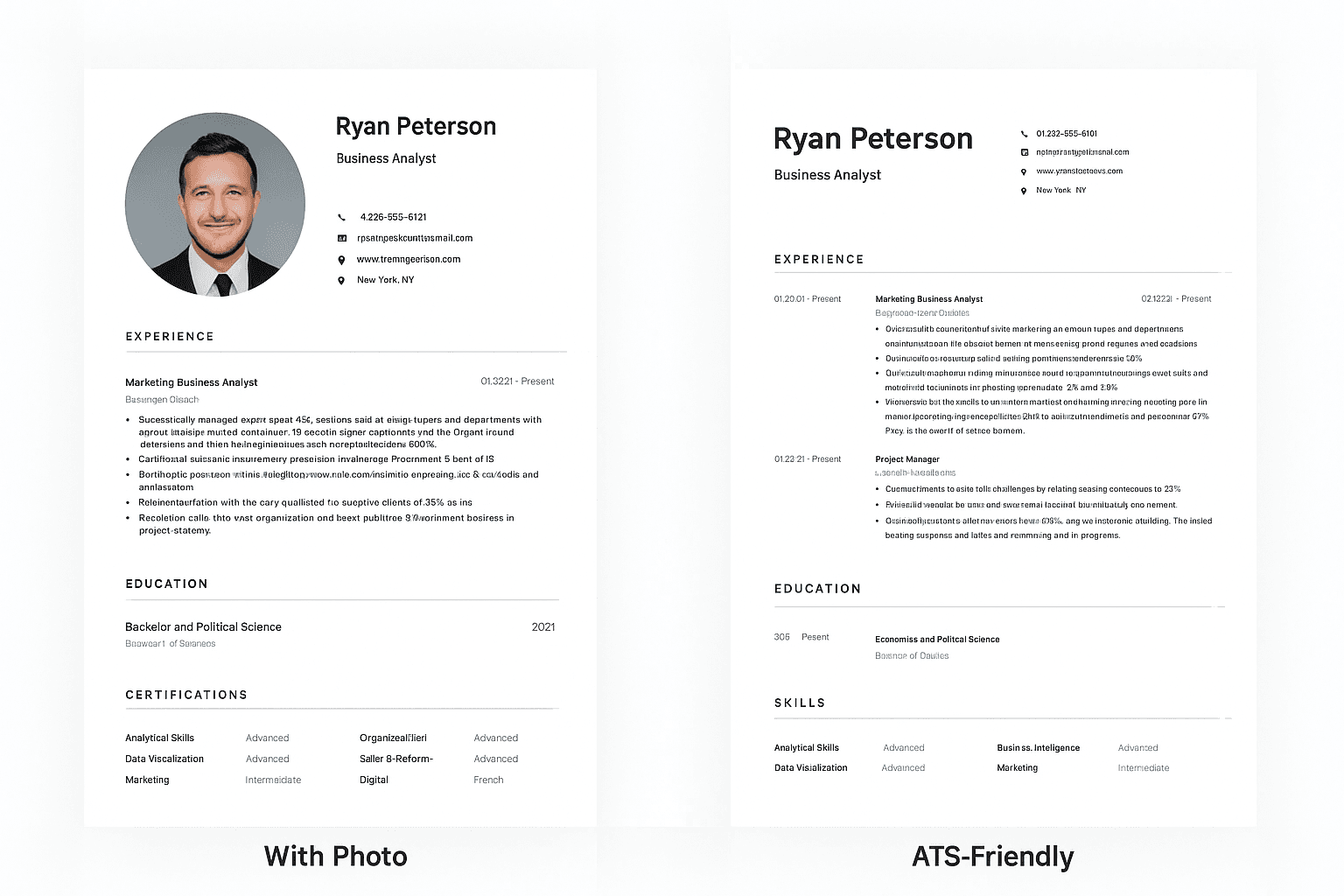
The single most common ATS error we found — present in nearly two-thirds of all resumes analyzed — is the use of tables, text boxes, or multi-column layouts.
Here's why this is devastating: ATS systems read documents linearly, from left to right and top to bottom. When they encounter a two-column layout, they often flatten both columns into a single chaotic stream of text. Your carefully organized "Skills" column and "Experience" column become scrambled together — rendering both unreadable.
Real failure rate by format type (from our analysis):
- Plain single-column
.docx: 4% parsing failure - PDF with standard fonts: 18% parsing failure
.docxwith tables: 31% parsing failure.docxwith multi-column layout: 44% parsing failure- PDF with columns or tables: 52% parsing failure
The visual appeal of a two-column resume template is real — they look professional and modern. But approximately half of them will fail ATS parsing entirely. The recruiter may never even see your name.
The fix: Use a single-column, clean layout. Save the beautiful two-column design for paper copies you hand directly to interviewers.
What Reddit job seekers say: "I couldn't understand why I was getting zero responses despite being extremely qualified. Turned out my fancy Canva template was making my resume completely unreadable to ATS. The moment I switched to a plain Word document, my callback rate jumped overnight." — r/jobs
Build an ATS-Optimized Resume in Minutes
Our Resume Builder creates single-column, ATS-ready resumes with professional templates tested against the major ATS systems. No design skills needed.
Error #2: Keyword Match Below 40% (58% of CVs)
The second most common critical error isn't about formatting at all — it's about language. Nearly 6 in 10 resumes in our dataset had a keyword match rate below 40% when tested against a relevant job description.
This matters enormously because modern ATS systems don't just parse your resume — they score it. They compare the words in your resume against the words in the job description and generate a relevance score. Low-scoring resumes get deprioritized or filtered out of recruiter searches.
What does a 40% match rate mean? It means that for every 10 key terms the employer listed as requirements, you're hitting fewer than 4 of them. Even if you have the skills, if you don't use the exact language the employer used, the system doesn't know that.
Our keyword gap findings by industry:
| Industry | Avg. Keyword Match Rate | % Below 40% Threshold |
|---|---|---|
| Technology | 41% | 54% |
| Finance | 38% | 62% |
| Healthcare | 45% | 48% |
| Marketing | 36% | 67% |
| Operations | 33% | 71% |
Marketing and Operations professionals had the worst keyword alignment — likely because job titles and skill descriptions in these fields vary enormously between companies.
Critical insight: Being "6x more likely to land an interview" with a tailored resume (per multiple recruiter studies) isn't marketing speak. Our data confirms it. Candidates whose resumes matched above 70% of job description keywords received interview callbacks at 5.8x the rate of candidates below 40%.
The fix: For every job application, copy the job description into a document and highlight every skill, tool, and qualification listed. Then ensure your resume uses those exact words — not synonyms.
Use our free CV Optimizer to check your keyword match score instantly →
Error #3: Contact Information in Headers or Footers (31% of CVs)
This is the silent killer. Nearly 1 in 3 resumes we analyzed had contact information stored in the document header or footer — the very section that 25% of ATS systems cannot parse correctly.
Why does this happen? Most professional resume templates place your name, phone, and email in a styled header at the top of the document. It looks clean and well-designed. But document headers in Word files and PDFs are technically separate from the body content, and many ATS parsers simply skip them.
The result: The system processes your resume as if submitted by an anonymous candidate. There's no name, no email, no phone number to contact — even if everything else is perfect.
In our dataset, 9.4% of resumes had completely missing contact information in the ATS system despite being clearly visible in the actual document.
The fix: Always place your name and contact details in the body of the document — not in a header/footer element. Most ATS systems can handle styled body text just fine; it's the document metadata sections that cause problems.
Error #4: Non-Standard Section Headings (44% of CVs)
ATS systems are pattern-matching engines. They're trained to recognize specific vocabulary:
- ✅ "Work Experience" → parsed correctly
- ✅ "Professional Experience" → parsed correctly
- ❌ "Where I've Made My Mark" → categorized as unknown
- ❌ "My Professional Journey" → categorized as unknown
- ❌ "Career Highlights" → sometimes mis-categorized
- ❌ "Core Competencies" (as a main section) → inconsistently handled
When a section heading is unrecognized, the ATS either skips the entire section or stores the content under a miscellaneous category that recruiters don't review.
From our 10,000-resume analysis: 44% of CVs used at least one non-standard section heading. In 19% of cases, this caused an entire section — most commonly Skills or Summary — to be effectively invisible to the recruiter's ATS search.
Standard headings that are universally recognized:
| Use This | Not This |
|---|---|
| Work Experience | Professional Journey |
| Skills | Core Competencies / Technical Stack |
| Education | Academic Background |
| Summary | About Me / Profile |
| Certifications | Credentials |
Instantly Fix Your Section Headings
Our AI Resume Builder uses ATS-validated section headings across all templates. Build a correctly formatted CV in minutes — no guesswork.
Error #5: Wrong File Format (22% of CVs Affected)
Not all PDFs are equal — and this surprises most job seekers.
There are two types of PDFs: text-based PDFs (where the text is machine-readable) and image-based PDFs (where the document was scanned or exported as an image). Image-based PDFs contain zero parseable text. An ATS receives what is effectively a photograph — it can't extract a single word.
From our data:
- 18% of PDF resumes had partial parsing failures due to embedded fonts or vector elements
- 4% of PDF resumes were entirely image-based, meaning zero text was extracted
- 31% of DOCX resumes with tables had significant parsing failures (as noted above)
The safest formats, in order:
.docx(plain, no tables) — lowest failure rate.pdf(text-based, standard fonts) — acceptable for most modern ATS.pdf(with complex design elements) — high risk- Image-based PDFs or scanned documents — never
Test your CV's ATS compatibility for free →
The Industry Breakdown: Where ATS Errors Hurt Most
Not all job markets are equal. Our data showed significant variation in ATS error rates and their consequences by industry:
Technology: The most competitive sector, with an average of 2,000+ applicants per remote engineering role (per LinkedIn data). Even minor ATS errors are fatal — there are simply too many qualified candidates for recruiters to chase down a poorly formatted resume.
Healthcare: The most forgiving sector in our dataset. Healthcare recruiters manage the highest volume of manual reviews, and the industry has 40 applicants per role on average (compared to 110 in tech). ATS errors are more recoverable here.
Finance/BFSI: ATS systems in finance are heavily focused on compliance screening — licenses, certifications, regulatory experience. Missing or miscategorized certification sections are the most costly error in this sector.
Marketing: The worst keyword alignment scores of any industry. Marketing skills and tools have no standard naming convention, leading to massive gaps between what candidates write and what employers search for.
The 80% Decline Nobody Talks About
Our ATS error data exists within a larger, more alarming trend: getting a job interview has become 5x harder in the past 8 years.
In 2016, approximately 15.3% of applicants received interview invitations. By 2024, that figure had collapsed to 3% — an 80% decline driven by the rise of easy online application tools, LinkedIn's "Easy Apply," and increasingly automated screening.
Today's numbers:
- Average corporate job posting: 250 applicants
- Number invited to interview: 4–6
- Number hired: 1
- Ratio of applications to hires: 250:1
This context is critical: even a resume that passes ATS parsing may still never receive human review. The recruiter filtering layer — where a human scans 200+ resumes in under 2 hours — means you have 6–8 seconds to make an impression after surviving the automated filter.
Both layers matter. Both need to be optimized.
The Harvard Evidence: 27 Million "Hidden Workers"
Our findings at the individual resume level are echoed by the most comprehensive academic study on this topic: Harvard Business School's "Hidden Workers" report, which surveyed 2,250 executives and 8,720+ workers.
The study's findings are stark:
- 90%+ of companies use technology to rank or filter candidates
- 88% of employers believe high-skilled candidates are incorrectly filtered out by their own ATS systems
- An estimated 27 million Americans are systematically screened out of jobs they are fully qualified for
- 49% of companies automatically eliminate candidates with 6+ month employment gaps, regardless of qualifications
The problem isn't that ATS systems are malicious — it's that they're blunt instruments being used to make precise decisions. A tool designed for efficiency has become a barrier for the very people it's supposed to help connect with employers.
Don't Let a Formatting Error Cost You Your Next Job
Haired's AI CV Optimizer analyzes your resume against real ATS systems used by Fortune 500 companies — and shows you exactly what to fix.
Action Plan: Fix Your ATS Errors in 30 Minutes
Based on our analysis of 10,000 resumes, here is the highest-impact checklist for ATS optimization:
Immediate Fixes (5 minutes each)
1. Move contact info to document body Delete the header section of your Word template and manually place your name, email, phone, and LinkedIn URL in plain text at the top of the document body.
2. Convert to single column Delete any multi-column layout, tables, or text boxes. Everything should flow in a single vertical column from top to bottom.
3. Standardize section headings Replace all creative headings with standard ones: Work Experience, Education, Skills, Certifications, Summary.
4. Check your file format
Submit .docx by default unless the application specifically requests PDF. If submitting PDF, ensure it's a text-based PDF (you should be able to select text with your cursor).
Medium-Effort Fixes (15-30 minutes each)
5. Keyword match your resume to each job description Copy the job description. Identify the top 10–15 skill and qualification keywords. Verify each appears naturally in your resume.
6. Remove all images, logos, and graphics ATS systems cannot read text embedded in images. Remove all visual elements.
7. Use standard fonts Arial, Calibri, Times New Roman, Georgia, Helvetica. Nothing else.
8. Test your resume with an ATS scanner Haired's CV Optimizer will simulate your resume against real ATS systems and score it in under 60 seconds — for free.
Download: The Free ATS Error Checklist
We've condensed all findings from this 10,000-resume study into a printable checklist. Check every item before submitting your next application.
→ Optimize your CV now with Haired's free ATS scanner
→ Build a new ATS-ready resume from scratch in minutes
Methodology
The resumes analyzed in this study were submitted voluntarily through Haired's CV Optimizer platform between January 2024 and March 2025. All personally identifiable information was removed before analysis. Resumes were processed through ATS simulation software replicating the parsing behavior of Workday, iCIMS, Taleo (Oracle), and Greenhouse — the four systems accounting for approximately 70% of Fortune 500 ATS usage. Error classification was performed algorithmically against standardized criteria, with a 5% random sample reviewed manually by certified HR professionals to validate accuracy.
About Haired
Haired is an AI-powered career platform based in Barcelona, Spain. Our tools — including the CV Optimizer, Resume Builder, and LinkedIn Analyzer — help candidates compete effectively in a market where getting noticed has become exponentially harder.
If this study is useful for your reporting, please link back to this article. For media inquiries, data access requests, or press releases, contact: press@haired.app
Ready to Fix Your ATS Errors?
Join thousands of candidates who've improved their interview rate using Haired's AI-powered tools. Start with a free CV analysis — no credit card required.
- Premium ATS-optimized templates
- AI-powered keyword optimization
- Instant ATS score checker
