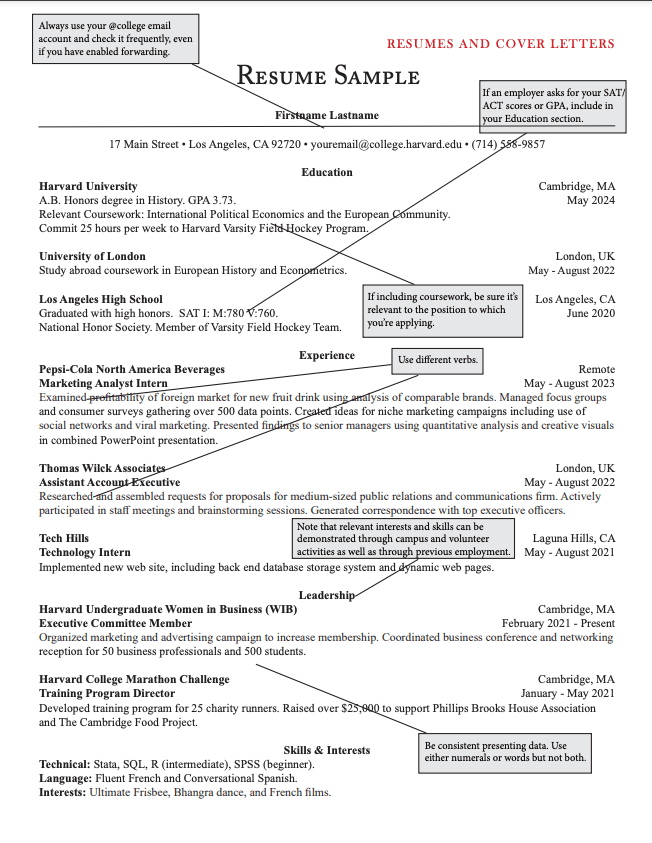
Free ATS-Friendly CV Template You Can Actually Edit (2026)
An ATS-friendly CV template is a single-column layout with standard section headings, a common font, and no tables, columns, text boxes, or graphics — because applicant tracking systems read a resume as plain text, top to bottom, and anything that breaks that reading order can get misread or dropped. That's the whole requirement. Below is the exact structure to copy, section by section, plus what specifically to avoid — because most templates labeled "ATS-friendly" online still include at least one of these mistakes.
The Exact Structure That Passes ATS Parsing
Copy this section order and formatting. Nothing more elaborate is needed:
[Full Name]
[Phone] | [Email] | [City, Country] | [LinkedIn URL]

SUMMARY
2–3 lines. Your role, years of experience, and one measurable result.

EXPERIENCE
[Job Title] — [Company Name]
[Month Year] – [Month Year]
• Achievement-focused bullet with a number
• Achievement-focused bullet with a number
• Achievement-focused bullet with a number

[Repeat for each role, most recent first]

EDUCATION
[Degree] — [Institution]
[Year]

SKILLS
[Comma-separated list, matched to the job description's exact terms]
That's the entire template. No sidebar, no header/footer, no icons next to your contact details, no skill bars or progress graphics.
Skip Formatting It By Hand
HAIRED's free CV Builder outputs single-column, ATS-tested resumes automatically — pick a template, fill in your info, and it's already structured correctly.
What Makes a Template Fail ATS Parsing?
These are the specific mistakes that break otherwise good-looking templates:
- Multi-column or sidebar layouts. ATS software often reads left-to-right, line-by-line — a sidebar with your skills next to your main experience column can get read out of order or merged into nonsense.
- Tables used for layout or spacing. Even invisible tables (used to align dates to the right) can confuse parsers that read cell-by-cell instead of in visual order.
- Text inside text boxes or headers/footers. Some ATS parsers skip headers and footers entirely — if your contact information lives there, it may never get extracted.
- Non-standard section titles. "My Journey" instead of "Experience," or "What I Bring" instead of "Skills," can prevent the ATS from correctly categorizing that section's content.
- Icons and graphics as functional elements. A phone icon next to your number is usually fine as an image, but if the icon replaces the word "Phone:" as a label the ATS uses to identify the field, the field can go unlabeled.
- Unusual fonts or heavy stylization. Stick to Arial, Calibri, Georgia, or similar — decorative fonts can render as broken characters when a parser extracts the text.
How Do I Get a Microsoft Word CV Template That's Actually ATS-Safe?
Most default Word resume templates are built for visual appeal first, which usually means a two-column or sidebar layout — the opposite of what parses cleanly. If you're building in Word directly:
- Start from a blank document, not a template gallery design.
- Use Word's built-in Heading styles for section titles (Heading 2 works well) instead of manually bolding text — this preserves a clean document structure.
- Use simple bullet points (the standard bullet character), not custom bullet icons.
- Avoid the Insert > Table function entirely, even for aligning dates.
- Save as .docx, and only convert to PDF if the job posting doesn't explicitly ask for a Word file — some ATS platforms parse .docx more reliably than PDF.
If that sounds like more setup than it's worth, a builder that outputs clean single-column HTML/PDF by default skips all five steps.
Tailored Applications Get 5.8x More Callbacks
HAIRED's analysis of 10,000+ resumes found candidates whose CV matched 70%+ of a job description's keywords got callbacks at 5.8x the rate of those below 40%. A clean template is step one — matching the job description is step two.
Does the Template Matter More Than the Content?
No — and this is the part free template downloads never tell you. HAIRED's analysis of 10,000+ resumes found 73% had at least one critical ATS parsing error, but formatting was only half the story: nearly six in ten resumes scored below a 40% keyword match against a relevant job description, even when the formatting itself was clean.
A perfectly structured template with generic content still gets filtered — modern ATS platforms don't just check if a resume parses, they score how well it matches the specific posting. The template gets you read correctly. The content gets you scored well. You need both.
How Do I Write Each Section of the CV?
Use this as a writing template, section by section:
- Summary (2–3 lines): role + years of experience + one measurable result + the type of role you want. "Customer success manager with 6 years in B2B SaaS. Cut churn from 9% to 5% across a 240-account portfolio. Looking for a remote CSM lead role."
- Experience (3–5 bullets per job): start each bullet with a specific verb, then what you did, then the result in numbers. "Rebuilt the onboarding flow, reducing time-to-first-value from 21 to 9 days." Avoid "Responsible for".
- Skills (6–12 items): the hard skills and tools named in the job posting, written exactly as the posting writes them ("Salesforce", not "CRM software").
- Education: degree, institution, year. Add grades or honours only if they're recent and strong.
- Optional sections: certifications, languages (with level, e.g. "Spanish – C1"), and projects if you're early in your career.
Need stronger verbs? See our guides to replacing "led", "developed" and "managed".
How Do I Convert My Existing CV to an ATS-Friendly Format?
- Remove the layout problems: move everything into a single column, delete tables, text boxes, icons and headers/footers, and put your contact details in the body.
- Rename the section headings to the standard ones: Summary, Experience, Education, Skills.
- Paste the job posting next to your CV and add the missing keywords where they're true for you.
- Save as .docx or a text-based PDF (not a scanned image or a PDF exported from a design tool as flattened graphics).
- Test it: upload it to a free ATS checker like HAIRED's CV optimizer to see your score and any parsing errors before you apply.
The faster route: upload your current CV or your LinkedIn PDF to HAIRED's Resume Builder, which extracts your content into this single-column structure automatically.
How Do I Use This Template Well?
- Fill in every section before you tailor it. A template with placeholder text still confuses ATS scoring the same way a bad template structure does.
- Match section headings to the exact words the job posting uses, where reasonable — "Skills" is safer than "Core Competencies" unless the posting itself uses that phrase.
- Re-check your keyword match for every application. The same template, the same base content, but the specific skills and phrasing should shift toward each posting's language.
- Export to PDF only after confirming the posting accepts it. Some older ATS platforms still parse .docx more reliably.
Build the Template Above in Under a Minute
HAIRED's free CV Builder starts from this exact single-column, ATS-tested structure — no formatting decisions to get wrong.
The Bottom Line
The structure above is the entire "ATS-friendly" requirement — there's no secret trick beyond single-column, standard headings, and no tables or graphics. What actually determines whether you get a callback is what you put inside that structure: specific, measurable achievements written in the language of the job you're applying to. Get the template right once, then spend your time tailoring the content for every application, not reformatting it.
