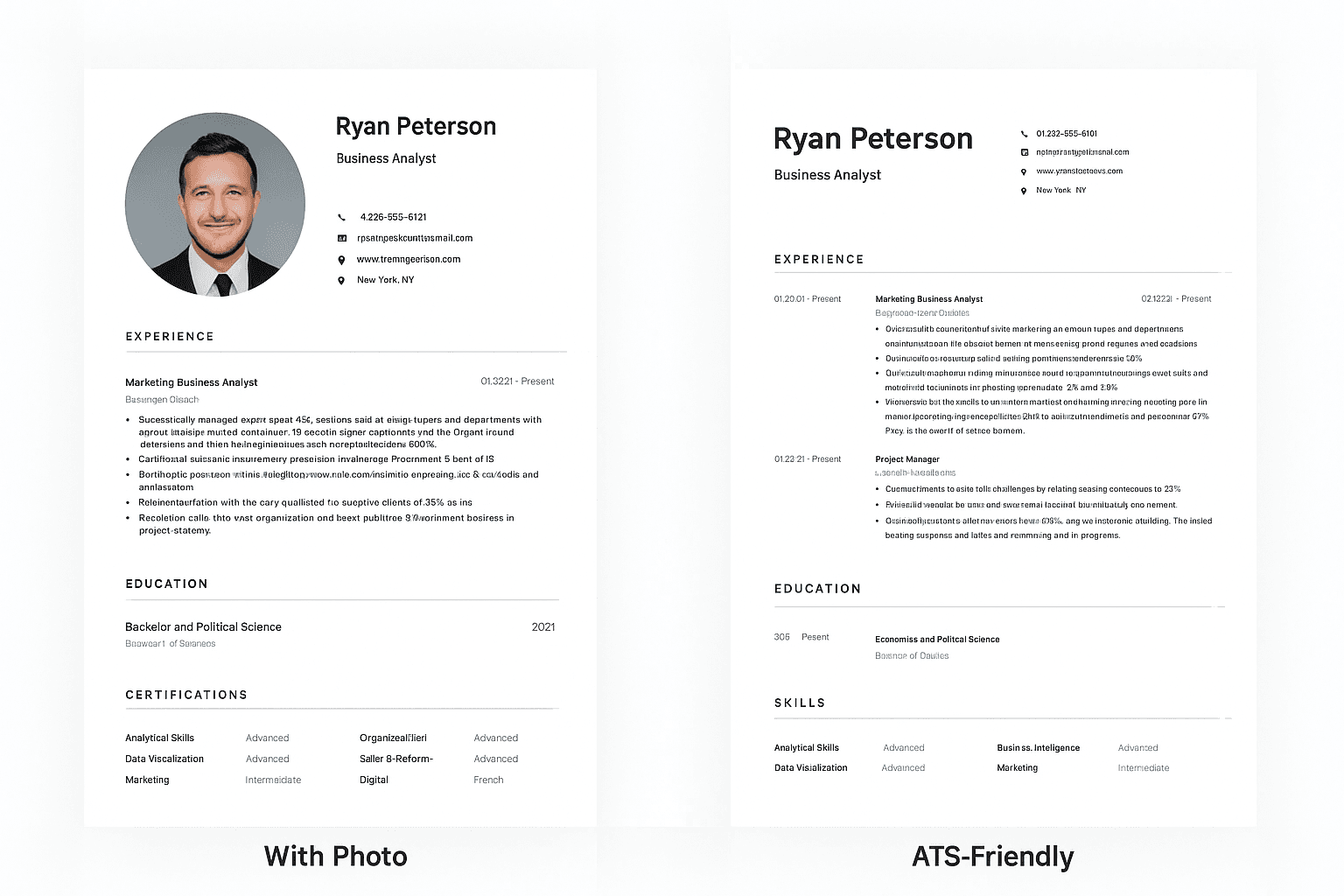
Quick Answer: Does Canva Work for ATS Resumes?
No — in most cases. Canva resumes rely on multi-column layouts, text boxes, and embedded graphics, which are exactly the formatting patterns that cause Applicant Tracking Systems (ATS) to misread or reject a resume before a recruiter ever opens it. In HAIRED's analysis of 10,000 real resumes, 61% had a formatting error — tables, columns, or graphics — and 29% specifically contained embedded images an ATS couldn't read at all.
If you built your resume in Canva and aren't getting callbacks, the design that makes it look great to a human is very likely what's making it invisible to the software that screens it first.
The short version: switch to a single-column, text-based resume built — or checked — by a tool designed around ATS parsing rather than visual design. Below: exactly why Canva fails, and 6 AI resume builders built to pass, including HAIRED (free), Kickresume, BetterCV, Teal, Enhancv, and Zety.
If you're reading this article, you've probably already created a resume with Canva and it hasn't worked out, or you haven't received any calls. Let me tell you, that's perfectly normal, and in most cases, it's not your fault.
In this article, I'm going to explain why you shouldn't create your resume with Canva and the things you should keep in mind when creating your resume that will lead to many more interviews and, consequently, job offers.
The current landscape
Everyone is complaining about the job market these days, saying it's terrible and there are no jobs. But if we really look at the data, we see the opposite. We can see that we're actually experiencing the greatest number of jobs in history, and this is because, with artificial intelligence, there are more jobs than ever before.
But let me tell you something: just because there are more jobs than ever doesn't mean it's any easier. The days of simply showing up at a factory and saying you need a job are over. And now, it's not enough to just submit your CV to every company. No, now your CV has to be the best one you can find.
There are apps for everything now: apps like Landeo that send you CVs directly, platforms that check your CV. But where all these platforms agree is on one thing: you need an optimized CV to apply for positions. And that's the case here. Canva isn't going to give you an optimized CV, since Canva is made for designers, not for people looking for remote or office work.
What you should keep in mind.
Now it's easier than ever to apply for jobs, and God knows that for every job you apply for, there are people from all over the world applying automatically with bots. This causes companies to become overwhelmed with CVs sent by robots 24/7. Sending a CV won't get you the job anymore; now you have to be different.
To limit this, companies have created Applicant Tracking Systems (ATS). These systems automatically detect keywords in your resume and determine whether you're a worthwhile candidate in seconds. Yes, it's incredibly sad that a machine does it, but it's the absolute truth. And more and more companies are implementing these ATS systems so that 90% of CVs don't pass the filters, and only those who truly create their CVs with this in mind will get through.
Canva is a design company, as I mentioned, and the first thing these filters will eliminate are CVs created by them, since the format and designs aren't read correctly and are therefore automatically rejected.
This is what causes a Canva CV to be automatically deleted:
- It contains graphics within the CV itself.
- It contains figures within the CV.
- It struggles to find keywords.
The solution
Now that you understand why CVs created with Canva are automatically deleted, it's time to tell you what these ATS filters DO consider when evaluating your CV.
Content: In general, what your CV contains and how it's written. If you speak in the first person, or if you include data that isn't supported by numbers or actions, this is frowned upon by the ATS filters.
Formatting: If you lack information or the dates don't make sense, you'll also be penalized. If you're unclear about a role or if you don't include a date, you'll also be penalized.
CV type: This is also an important factor. If you have a Canva CV that is too large, the system will automatically discard it.
If you've realized that your CV doesn't pass any of these filters, I'm going to share some tools you can use to improve it with AI systems specifically designed to enhance how these summaries are read, helping you move on to the next stage.
1 - Haired.app
This is one of the most popular and newest tools, as it's a system that revolutionizes how CVs are created with AI. It was developed by recruiters worldwide and uses information directly from companies that create these same Applicant Tracking Systems (ATS).
This tool offers a free analysis of your CV upon registration and provides tips on how to improve it. You can also adjust the design levels. Additionally, it has other features, such as directly scanning your CV to show you recently posted jobs so you can apply before anyone else.
It's a freemium tool, meaning you have some free tools you can use to improve your CV, and others if you're really serious about creating a CV and searching for a job.
Find Out If Your Resume Has the Same Problem
Run your CV through HAIRED's free ATS analyzer and see exactly which formatting or keyword issues are holding you back — in under 60 seconds.
2 - Kickresume
Kickresume has arguably the most visually impressive templates of any resume builder on this list — genuinely good design, the kind of resume you'd want to hand someone at a networking event. The AI writing assistant is also strong; its GPT-powered rewriting produces some of the most natural-sounding bullet points among AI resume tools.
The problem is the same one Canva has, just less extreme: many of its best-looking templates use multi-column layouts and graphical elements, which is exactly what causes ATS parsing failures. If you're applying through an online system where a machine reads your resume before a person does, a beautiful Kickresume export can be as invisible as a Canva one.
Best for: creative fields where you're handing a resume directly to someone. Not the first choice if most of your applications go through an ATS.
3 - BetterCV
BetterCV is a straightforward CV builder with clean, professional templates and basic AI writing assistance — a reasonable step up from Canva if all you need is a well-formatted template fast. Unlike Canva, its templates are built with resumes specifically in mind, not general graphic design.
The thing to know before signing up: BetterCV's free trial (typically $3-4) has a documented pattern of converting into a recurring charge, often $25-30/month, that a meaningful number of Trustpilot reviewers say they didn't clearly agree to. The product itself works — it's the billing model that catches people out. Full breakdown in our BetterCV review.
Best for: a quick, well-formatted template, if you read the trial terms carefully before entering a card.
4 - Teal
Teal pairs a resume builder with a job-application tracker, which makes it a strong pick specifically if you're applying to a high volume of roles and want to keep several tailored resume versions organized in one place — something none of the other tools here do.
Two things to watch: pricing is billed weekly ($13/week, which works out higher than the advertised monthly rate if you're not careful about which plan you pick), and some of its templates use two-column layouts with the same ATS risk as Kickresume's. Full pricing and formatting breakdown in our Teal review.
Best for: job seekers managing a large number of applications who don't mind a subscription.
5 - Enhancv
Enhancv sits in a similar space to Kickresume — strong, design-forward templates that are a good fit for visual or creative roles. It maps LinkedIn data cleanly into its templates if you're importing your profile directly.
The same caveat applies here as with the other design-first tools: several of Enhancv's templates use multi-column layouts, which is worth checking against a plain-text ATS test before submitting to a strict corporate system.
Best for: design-forward roles and portfolios, with an ATS check as a separate step before you apply online.
6 - Zety
Zety is a fast, wizard-style builder — you can get a full resume assembled quickly, and the templates themselves are clean and single-column, which is a genuine advantage over Canva or Kickresume on the ATS side. The AI suggestions tend to be generic ("Responsible for managing...") rather than tailored to your actual background, so expect to rewrite most of what it generates.
The bigger issue is billing, not formatting: Zety's low-cost trial (around $1.95-2.70) auto-renews into a $25.95 charge every four weeks — 13 times a year, not 12 — unless you cancel first. There's also a hard paywall at download, so you build the entire resume before seeing the price. Details in our Zety review.
Best for: a quick starting template you plan to rewrite yourself, managed carefully around the billing cycle.
Canva vs. AI Resume Builders: Quick Comparison
| Tool | Built for ATS | Free Download | Price | Watch Out For |
|---|---|---|---|---|
| Canva | ❌ No | ✅ | Free + paid plans | Graphics, columns, and figures ATS can't parse |
| HAIRED | ✅ Full ATS check | ✅ | Free, no card required | — |
| Kickresume | ⚠️ Depends on template | ❌ | From ~€8/mo | Best templates double as ATS risk |
| BetterCV | ✅ | ⚠️ Trial only | Trial → $25-30/mo | Trial-to-subscription billing pattern |
| Teal | ⚠️ Depends on template | ✅ | $13/week or $29/mo | Weekly billing, 2-column templates |
| Enhancv | ⚠️ Depends on template | ❌ | Paid plans | Design-forward, check ATS separately |
| Zety | ✅ | ❌ (paywall at download) | Trial → $25.95/4wk | Hard paywall, generic AI text |
Bottom Line
Canva builds beautiful resumes for humans and unreadable ones for the software that screens them first — that's not a knock on Canva, it's simply not what the product was built for. If you've been applying for a while with no callbacks and your resume was designed in Canva, the format is a genuine, fixable suspect before you assume it's your experience or qualifications.
Every alternative above fixes the ATS problem to some degree, but the trade-offs differ: some trade it for a subscription (BetterCV, Teal, Zety), some only partly fix it depending on the template you pick (Kickresume, Enhancv), and HAIRED is built around ATS compatibility as the starting point rather than an afterthought, with a free tier that doesn't require a card to start.
Check your current CV's ATS score for free, or build a new one from scratch — both take a few minutes, and either way you'll know exactly what's stopping your resume from being read, not just guessing.
Stop Guessing Why You're Not Getting Callbacks
Upload your CV and get a free, detailed ATS compatibility report — the same checks recruiters' systems actually run.
- Premium ATS-optimized templates
- AI-powered keyword optimization
- Instant ATS score checker
