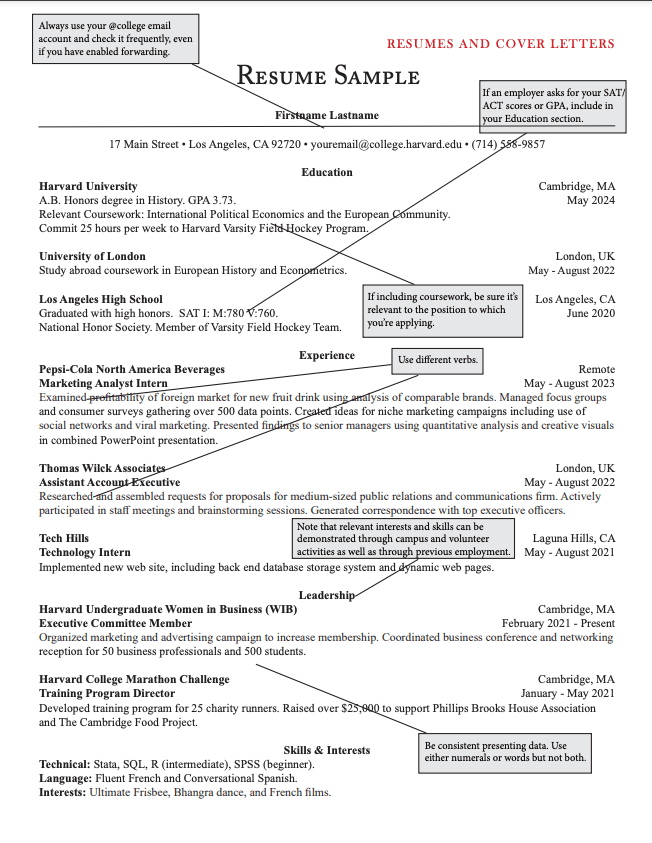
Short answer: a Google Docs resume template passes ATS if it is a single column, built from plain text (no tables, text boxes or images), with your contact details in the body of the page and standard headings like Experience, Education and Skills. Pick the plainest template in the gallery, avoid anything with a sidebar, and export it as a .docx or a text-based PDF.
The risk is not Google Docs. It is the layout. According to HAIRED's analysis of 10,000 resumes, 73% had at least one critical ATS error and 61% had formatting errors such as tables, columns or graphics (see the full study).
Are Google Docs resume templates ATS-friendly?
It depends on the template, not the tool. Applicant tracking systems read text in order, from top to bottom. A template breaks that order when it uses:
- Two or more columns (a sidebar for skills or contact details)
- Tables used for layout
- Text boxes and shapes
- Icons, photos or skill bars
Our parsing data shows how much the layout matters:
| File and layout | Parsing failure rate |
|---|---|
| Plain single-column .docx | 4% |
| PDF with standard fonts | 18% |
| .docx with tables | 31% |
| .docx with multi-column layout | 44% |
| PDF with columns or tables | 52% |
A single-column Google Docs resume exported to .docx sits in the best row. A two-column one exported to PDF sits in the worst.
How do I find a resume template in Google Docs?
- Open Google Docs and click Template gallery on the home screen (or File, New, From template gallery).
- Scroll to the Resumes section.
- Choose a simple layout. Serif-style, single-column options are the safest starting point.
- Before typing, click around the page. If you see table borders appear or a text box handle, that layout will not parse reliably.
How do I edit it so it still passes ATS?
Keep the structure, replace the content:
- Put your name and contact details in the main body, not in the page header or footer. HAIRED's data found that 31% of resumes kept contact information in headers or footers, which about 25% of ATS systems cannot read.
- Use standard headings: Summary, Experience, Education, Skills. Creative headings such as "My Journey" can hide a whole section from the system.
- Use real bullets from the toolbar, not typed symbols or tab-aligned text.
- Stick to one common font (Arial, Calibri, Georgia) at 10 to 12 pt.
- Delete anything decorative: lines made from shapes, icons, skill-level bars, photos.
- Mirror the job post. Candidates whose resumes matched more than 70% of the job description's keywords got interview callbacks at 5.8 times the rate of those below 40% in our dataset.
How do I export a Google Docs resume: PDF or Word?
Use File, Download, then choose Microsoft Word (.docx) or PDF Document (.pdf).
- If the job post names a format, use it.
- If it does not, a single-column .docx is the lower-risk choice.
- A Google Docs PDF keeps real text, so it is fine for a clean single-column layout. Avoid printing to an image or scanning it.
Name the file clearly, for example Firstname-Lastname-Resume.pdf.
How do I check my Google Docs resume against ATS?
Do not trust how it looks on screen. Check what a parser extracts:
- Export the file.
- Run it through an ATS checker.
- Read the extracted text. If your experience is out of order, or a section is missing, fix the layout and repeat.
HAIRED's free CV Analyzer does this in about a minute, scores your resume out of 100 and lists the issues it finds, such as missing keywords and risky formatting.
Is Your Google Docs Resume Readable by ATS?
Upload it and see the score, the issues and the missing keywords in about a minute. Free, no card.
What if I would rather not fight a template?
A template editor that is built for ATS removes the guesswork. HAIRED's Resume Builder has single-column templates (including a Harvard-style one) that use standard headings and keep contact details in the body. You can import an existing resume and switch template without retyping, then download it as a PDF.
If you are choosing between formats, these guides help: how to make an ATS-friendly CV, ATS-friendly CV template and CV vs resume.
Sources:
- HAIRED, We Analyzed 10,000 CVs: parsing failure rates by file and layout, contact-in-header data, keyword match and callback rate
- Google Docs Template gallery and File, Download menu (checked in the product)
